


もっけ
あるモデルのパーツを作ったとき、モデルに関する設定値はひとまとめにしたいですよね。
武器だったとしたら、ダメージ値とか耐久度とか。車だったら、最高速度とか車の色とか。
そういった設定値を「属性」として持たせることが出来ちゃうんです。
出来るようになること
- 各パーツやモデルに設定値「属性」を追加することができる
設定方法
①プロパティから「属性を追加」を選択します。
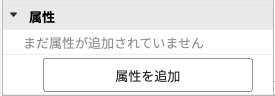
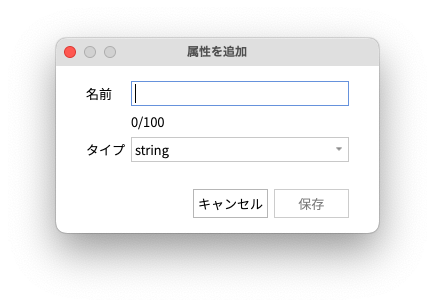
②ポップアップウィンドウが表示されるので、「属性」を追加します。
名前は任意でつけてください。タイプには、さまざまな種類があります。
| タイプ | 内容 |
| string | 文字、数字、記号などの文字のシーケンス |
| boolean | false(偽)またはtrue(真) |
| number | 数値データ |
| UDim | 数値のペア。スケール/「相対」測定値とオフセット/「絶対」測定値を表します。 |
| UDim2 | X軸とY軸の2つのUdimの組み合わせ。UI要素のサイズと位置を設定するために使われる。 Udim2.new(XScale, XOffset, YScale, YOffset) |
| BrickColor | 事前定義された名前付きのカラー値 |
| Color3 | カラーのRGB値 |
| Vector2 | 方向と大きさを持つ2D値。 X軸は、Vector2.(xAxis) Y軸は、Vector2.(yAxis) |
| Vector3 | 3D空間内のベクトル Vector.new(x, y, z) |
| EnumItem | 列挙型の値 |
| NumberSequence | 0から1までの一連の数値 |
| ColorSequence | 0から1までの色のグラデーション |
| NumberRange | 最小値と最大値の範囲 |
| ColorSequence | 0から1までの色のグラデーション |
| Rect | 2D平面上の長方形 |
属性を追加したのち、歯車の設定マークで値や名称を変更することが可能です。
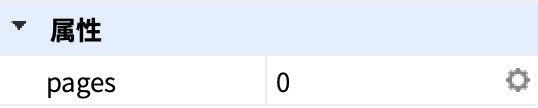
属性の作成/変更
属性値を変更するには、名前と値を設定し、SetAttribute()を使います。
local Book = script.Parent
Book:SetAttribute("pages", 5)
属性の取得
1つの属性値を取得するには、GetAttribute()を使います。
local Book = script.Parent
local pagesValue = Book:GetAttribute("pages")
全ての属性値を取得するには、GetAttributes()を使います。
local Book = script.Parent
local pagesAttributes = Book:GetAttributes()
for name, value in pairs(pagesAttributes) do
      print(name, value)
end
属性の削除
属性を削除するには、何も値がないことを示すnil を指定し、SetAttribute()を使います。
local Book = script.Parent
Book:SetAttribute("pages", nil)
属性の変更検出
1つの属性にGetAttributeChangeSignal()を接続し、任意の属性に対してAtttributeChangedを接続します。
local Book = script.Parent

Book:GetAttributeChangedSignal("pages"):Connect(function()
    print(Book:GetAttribute("pages"))
end)

Book:AttributeChanged:Connect(function(attributeName)
    print(attributeName, weapon:GetAttribute(attributeName))
end)

コメント