
もっけ
プラグインとは、便利なお役立ちツールのことです。
プラグインを使うことで難しいことも、かんたんに出来ちゃうので活用していこう!

寿司花
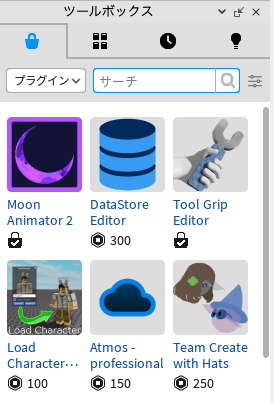
プラグインはツールボックスから「プラグイン」を選択すると出てくるわよ
おすすめのプラグイン
Load Character Lite
プラグインを起動して、ロブロックスのユーザ名を入れるだけでキャラクターをロードできるとっても便利なプラグイン。ProとLiteがあるけど、違いは分からない。

https://create.roblox.com/store/asset/752585459/Load-Character-Lite?keyword=Load+Character&pageNumber=1&pagePosition=1
create.roblox.com
Tool Grip Editor
プレイヤーが持つことができるツールのグリップの位置や角度、サイズなどを調整することができます。かんたんに調整できるとっても便利なプラグインなので、自作アイテムのツールを作る時は、必須。

https://create.roblox.com/store/asset/174577307/Tool-Grip-Editor?keyword=tool+grip+editor&pageNumber=1&pagePosition=0
create.roblox.com
AutoScale Plus
Image Buttonなどの画像を自動調整してくれるプラグイン。
PC、タブレット、スマートフォンなどデバイスの大きさに合わせての調整が簡単になる。

https://create.roblox.com/store/asset/5100886874/AutoScale-Plus?keyword=AutoScale+Plus&pageNumber=1&pagePosition=0
create.roblox.com
DataStoreEditor
Robloxのデータ表示および編集可能とするプラグイン。キーからデータをインポートおよびエクスポートすることもできます。

https://create.roblox.com/store/asset/701506235/DataStore-Editor?externalSource=www
create.roblox.com
Moon Animator 2
カットシーンなどの凝ったアニメーション作成が可能。使いこなすには少し学習時間が必要。

https://create.roblox.com/store/asset/4725618216/Moon-Animator-2?keyword=moon+animation+2&pageNumber=1&pagePosition=0
create.roblox.com

コメント